IF ELSE Statement Python Pemula dengan Google Colab [ 06 ]
Summary
TLDRThis video tutorial introduces Python conditional statements and comparison operators, demonstrating how to evaluate conditions using if, elif, and else. Viewers learn about operators like ==, !=, >, <, >=, and <=, with practical examples comparing variables. The tutorial covers handling positive, negative, and zero values, as well as converting Celsius temperatures to Fahrenheit and Reamur based on user input. It also demonstrates grade categorization using numeric input with validation. The video emphasizes proper indentation, input validation, and structured coding, making it an engaging and practical guide for beginners to understand logical decision-making and flow control in Python.
Takeaways
- 😀 Comparison operators in Python are used to compare two values and return a Boolean result (True or False). Common operators include '==', '!=', '>', '<', '>=', and '<='.
- 😀 The 'if' statement allows you to evaluate conditions and execute specific blocks of code based on whether the condition is true.
- 😀 Python's 'else' statement provides an alternative block of code to run when the 'if' condition is false.
- 😀 The 'elif' statement allows you to evaluate multiple conditions sequentially, executing the corresponding block of code for the first true condition.
- 😀 Indentation in Python is crucial for defining blocks of code. The block inside the 'if', 'elif', or 'else' must be properly indented to avoid errors.
- 😀 Using '==' compares two values for equality, while '=' is used for variable assignment. It's important to distinguish between these two operations.
- 😀 Google Colab automatically indents code when pressing 'Enter' after a colon (':'), making it easier to write clean, error-free Python code.
- 😀 Conditional statements can be used to check whether a number is positive, negative, or zero by evaluating specific conditions like 'x > 0', 'x == 0', etc.
- 😀 For more complex conditions, combining 'if', 'elif', and 'else' allows you to check multiple scenarios, like checking if a number falls within specific ranges.
- 😀 Practical applications of conditional statements include temperature conversions (Celsius to Fahrenheit or Reamur) based on user input, demonstrating how conditional logic works in real-world problems.
Q & A
What are comparison operators in Python?
-Comparison operators in Python are used to compare two values and return a boolean result (True or False). The main comparison operators are: `==` (equal), `!=` (not equal), `>` (greater than), `<` (less than), `>=` (greater than or equal), and `<=` (less than or equal).
How does the `if` statement work in Python?
-The `if` statement in Python is used to evaluate a condition. If the condition is `True`, the block of code under the `if` statement will be executed. If the condition is `False`, the code inside the `if` block will be skipped.
What happens if you don’t indent the code properly inside an `if` statement?
-In Python, proper indentation is crucial. If the code inside an `if` statement (or any block of code) is not indented properly, Python will throw an `IndentationError`, as it expects consistent indentation to determine the code structure.
What is the difference between `=` and `==` in Python?
-`=` is an assignment operator used to assign values to variables, while `==` is a comparison operator used to check if two values are equal. For example, `a = 10` assigns the value `10` to `a`, whereas `a == 10` checks if `a` is equal to `10`.
How do `elif` and `else` statements work in Python?
-The `elif` (else if) statement allows you to test multiple conditions after the initial `if` statement. If the condition in `if` is `False`, the `elif` condition will be tested. If no `if` or `elif` conditions are `True`, the code in the `else` block will be executed as a fallback.
Can you explain how `elif` is used with multiple conditions?
-`elif` is used when you have multiple conditions to test. If the `if` condition is `False`, Python will check the `elif` conditions in sequence. Once a `True` condition is found, the corresponding code block is executed, and Python skips the rest of the conditions.
How do you check if a number is positive or negative in Python?
-You can check if a number is positive, negative, or zero using `if`, `elif`, and `else` statements. For example, to check if a number `x` is positive, you would use `if x > 0`, to check if it is zero, use `elif x == 0`, and for negative values, use `else`.
Why is `input()` used in Python, and how does it relate to conditional statements?
-The `input()` function is used to get input from the user. When paired with conditional statements, you can make the program react to user input. For example, you can use `input()` to ask the user for a number and then check if the number is positive, negative, or zero using `if`, `elif`, and `else` statements.
What is the purpose of using `isnumeric()` with input values in Python?
-`isnumeric()` is used to check whether a string input consists entirely of digits. This is helpful when validating user input to ensure that it’s a number and not text or special characters before performing numerical operations.
Can you explain how conditional statements are applied in the temperature conversion example?
-In the temperature conversion example, the program uses conditional statements to check the user's choice of conversion. Based on the user's input (1 for Fahrenheit or 2 for Reamur), the program uses `if` and `elif` to apply the appropriate formula to convert from Celsius to the chosen scale (Fahrenheit or Reamur).
Outlines

Esta sección está disponible solo para usuarios con suscripción. Por favor, mejora tu plan para acceder a esta parte.
Mejorar ahoraMindmap

Esta sección está disponible solo para usuarios con suscripción. Por favor, mejora tu plan para acceder a esta parte.
Mejorar ahoraKeywords

Esta sección está disponible solo para usuarios con suscripción. Por favor, mejora tu plan para acceder a esta parte.
Mejorar ahoraHighlights

Esta sección está disponible solo para usuarios con suscripción. Por favor, mejora tu plan para acceder a esta parte.
Mejorar ahoraTranscripts

Esta sección está disponible solo para usuarios con suscripción. Por favor, mejora tu plan para acceder a esta parte.
Mejorar ahoraVer Más Videos Relacionados

If Else Conditional Statements in Python | Python Tutorial - Day #14
If Else Statements in Python | Python for Beginners
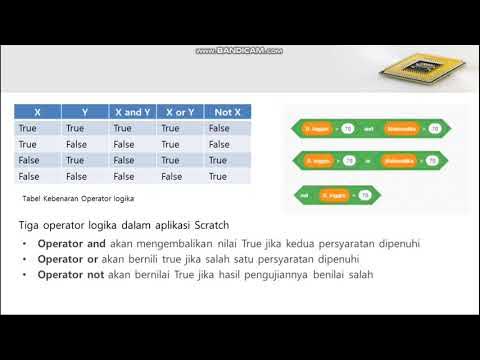
Informatika Kelas 8 Menggunakan Kondisi Percabangan Hal. 93-100
Belajar Python [Dasar] - 22 - ELIF Statement
Belajar Python [Dasar] - 21 - IF dan ELSE Statement

Minggu 3 - Eksekusi Kondisional
5.0 / 5 (0 votes)

