KOMPUTASI PERENCANAAN - PENGENALAN USER INTERFACE ARGIS
Summary
TLDRThis tutorial introduces beginners to ArcGIS 10.x, guiding users through the software's interface and essential tools for spatial data processing. It covers applications like ArcMap, ArcCatalog, and ArcScene, explaining functionalities such as buffer, clip, intersect, union, merge, and dissolve. The video emphasizes practical workflow tips, including layout preparation, table of contents management, bookmarks, and automation via Model Builder and Python. Users learn to navigate menus, toolbars, and coordinate settings effectively, while understanding how to combine and analyze spatial data accurately. The tutorial serves as a foundational guide for hands-on GIS analysis, preparing learners for advanced exploration in subsequent videos.
Takeaways
- 😀 The video introduces ArcGIS 10.x for data processing, focusing on ArcMap as the main tool for spatial analysis.
- 😀 ArcCatalog is used for file management, similar to Windows Explorer, and helps organize GIS data efficiently.
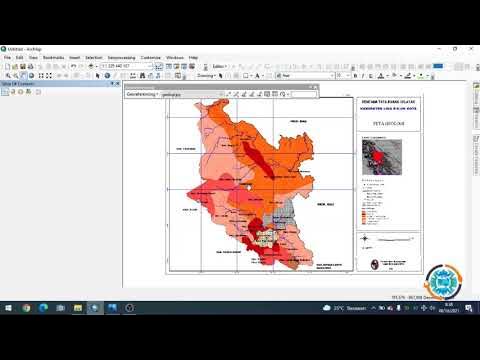
- 😀 ArcMap interface includes Menu Bar, Toolbars (Standard, Drawing, Layout, Editor, Advance Editing, Snapping), Table of Contents, and Main Map View.
- 😀 Key tools in ArcMap include Selection (select feature, edit tool, select element), Geoprocessing (buffer, clip, intersect, union, merge, dissolve), and Search for Tool for quick access.
- 😀 Intersect, Union, and Merge are different overlay methods: Intersect keeps only overlapping areas, Union combines all areas, and Merge joins multiple shapefiles without creating a new feature.
- 😀 Dissolve simplifies attribute tables by consolidating features with identical attributes, useful for large datasets.
- 😀 Bookmarks in ArcMap allow users to quickly navigate to specific map areas without scrolling.
- 😀 Layout View enables users to prepare map outputs with elements like title, scale, legend, projection info, logo, and coordinates.
- 😀 Python and Model Builder can automate repetitive GIS tasks, making complex analyses more efficient.
- 😀 Refresh and Post Drawing functions help maintain map display and workspace integrity during editing and zooming.
Q & A
What is the purpose of this ArcGIS video tutorial?
-The tutorial aims to help viewers understand and practice using ArcGIS software, especially for those who cannot follow along live. It allows users to repeatedly review and practice the steps to better understand data processing and analysis in ArcGIS.
Which version of ArcGIS is recommended in this tutorial?
-The tutorial uses ArcGIS version 10.x. Specific versions such as 10.3, 10.5, or 10.6 can be used, but ArcGIS Pro is not the focus here, although it can be used later once users are familiar with the tools.
What is the function of ArcCatalog in ArcGIS?
-ArcCatalog functions as a file management system similar to Windows Explorer. It helps organize and manage GIS files and is often used alongside ArcMap for easier data access.
What is the purpose of the MXD file in ArcMap?
-An MXD file stores the layout information of a map, including how data is displayed, but it does not contain the actual data files like shapefiles. It is mainly used to save map projects.
What are the main geoprocessing tools discussed and their uses?
-The main tools are Buffer, Clip, Intersect, Union, Merge, and Dissolve. Buffer measures distances around features, Clip cuts data to a specific area, Intersect overlays features and keeps only overlapping areas, Union combines datasets into one while preserving attributes, Merge combines separate datasets without creating a new feature, and Dissolve simplifies attribute tables by merging similar attributes.
How does the tutorial suggest handling large datasets with similar attributes?
-For large datasets with repeating attributes, the Dissolve tool is recommended to simplify the data by merging features with the same attribute, reducing complexity in analysis.
What is the role of bookmarks in ArcMap?
-Bookmarks allow users to save specific map views so they can quickly return to a particular location, such as a city or district, without manually scrolling through the map.
What are Model Builder and Python used for in ArcGIS?
-Model Builder allows users to automate workflows that require multiple tools with the same parameters, avoiding repetitive clicks. Python is used for scripting to perform conditional tasks or automate analysis in ArcGIS.
How should the table of contents and toolbars be set up for efficiency?
-The standard setup includes activating the Standard, Drawing, Layout, Editor, Advance Editing, and Snapping toolbars. The table of contents should display active files, and users can customize the layout for convenience.
What is the difference between Intersect, Union, and Merge?
-Intersect keeps only the overlapping areas between features, Union combines features into one dataset preserving attributes where overlapping occurs, and Merge simply combines multiple datasets into one without creating a new overlapping feature.
Why is it important to set coordinates and units correctly in ArcMap?
-Proper coordinate and unit settings ensure that spatial data aligns correctly, metadata is accurate, and analysis results are reliable. Incorrect settings can lead to misinterpretation of distances, areas, and locations.
Outlines

This section is available to paid users only. Please upgrade to access this part.
Upgrade NowMindmap

This section is available to paid users only. Please upgrade to access this part.
Upgrade NowKeywords

This section is available to paid users only. Please upgrade to access this part.
Upgrade NowHighlights

This section is available to paid users only. Please upgrade to access this part.
Upgrade NowTranscripts

This section is available to paid users only. Please upgrade to access this part.
Upgrade NowBrowse More Related Video



5.0 / 5 (0 votes)
