An introduction to Computer Storage - DAS, NAS & SAN #storage #databackup #windows #activedirectory
Summary
TLDRThis video provides an introduction to computer storage, explaining how data is retained temporarily or permanently. It explores the three main storage categories: Direct Attached Storage (DAS), Network Attached Storage (NAS), and Storage Area Network (SAN), detailing their definitions, examples, use cases, and advantages. DAS offers high performance and low cost for individual systems, NAS provides centralized file access over a network ideal for home and small business use, and SAN is a dedicated high-speed network for shared storage among multiple servers, supporting protocols like Fiber Channel, iSCSI, and FCoE. The video also compares SAN protocols and highlights practical applications in enterprise and personal environments.
Takeaways
- 💾 Storage is a mechanism that allows computers to retain data either temporarily or permanently.
- 🧠 Storage includes both the process of saving data and the hardware/software systems used to manage and retrieve it.
- 📂 There are three main storage categories: Direct Attached Storage (DAS), Network Attached Storage (NAS), and Storage Area Network (SAN).
- 🔌 DAS refers to storage devices directly connected to a computer, such as internal hard drives and USB devices.
- ⚡ DAS offers high performance, low cost, and simple setup due to the absence of network dependency.
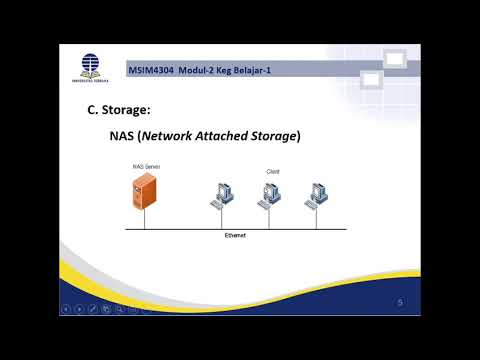
- 🌐 NAS is a centralized storage system connected to a network, allowing multiple users to access shared data.
- 🖥️ NAS devices are typically managed through a web browser and use protocols like NFS and CIFS for file access.
- 🏠 NAS is commonly used by home users and small businesses for file sharing, backups, and media storage.
- 🏢 SAN is a dedicated high-speed network specifically designed for storage, separate from the local area network.
- 🔗 SAN allows multiple servers to access shared storage as if it were locally attached.
- 🧩 SAN requires specialized hardware such as Host Bus Adapters, SAN switches, and specific cabling.
- 🚀 SAN supports protocols like Fibre Channel, iSCSI, and Fibre Channel over Ethernet (FCoE).
- 📊 Fibre Channel offers the highest performance but at a high cost, while iSCSI is cheaper but slower, and FCoE provides a balance.
- 🔄 NAS uses existing network infrastructure, which can increase network load, whereas SAN operates on a separate network.
- 📌 Choosing between DAS, NAS, and SAN depends on factors like performance needs, cost, scalability, and complexity.
Q & A
What is the definition of computer storage?
-Computer storage is the mechanism that enables a computer to retain data either temporarily or permanently, using hardware and software systems to save and manage digital data for later retrieval.
What are the three main categories of computer storage?
-The three main categories of computer storage are Direct Attached Storage (DAS), Network Attached Storage (NAS), and Storage Area Network (SAN).
What is Direct Attached Storage (DAS) and can you give examples?
-DAS is storage that is directly connected to a computer or server. Examples include internal hard drives, external USB drives, and pen drives.
What are the advantages of Direct Attached Storage (DAS)?
-DAS offers high performance due to no network latency, easy setup through plug-and-play devices, and low cost because it does not require additional software or network infrastructure.
How does Network Attached Storage (NAS) differ from DAS?
-NAS is connected to an Ethernet network, allowing multiple computers to access a centralized storage device, whereas DAS is directly connected to a single computer or server and does not provide networked access.
What protocols and management methods are used with NAS devices?
-NAS devices use file access protocols such as NFS (Network File System) and CIFS (Common Internet File System). They are typically managed through a web browser using HTTP or HTTPS interfaces.
What are typical use cases for NAS in home and business environments?
-At home, NAS is used for multimedia streaming, managing smart devices, and automated backups. In businesses, NAS is used for file sharing, backup targets, archiving, disaster recovery, and testing client-server applications.
What is a Storage Area Network (SAN) and how is it different from NAS?
-A SAN is a dedicated, high-speed network connecting multiple storage devices to servers, creating a shared pool of storage. Unlike NAS, it is isolated from the local area network and provides transparent access to storage as if it were local.
What hardware is required to set up a SAN?
-To set up a SAN, you need Host Bus Adapters (HBAs) or SAS controllers, SAN switches, storage devices, cables (optical fiber or Ethernet depending on protocol), and optionally, a Converged Network Adapter (CNA).
Which protocols are supported by SAN and how do they compare?
-SAN supports Fiber Channel (FC), iSCSI, and Fiber Channel over Ethernet (FCoE). FC uses optical fiber cables, offers very high performance, but is costly. iSCSI uses Ethernet cables, has lower performance, and is cost-effective. FCoE uses Ethernet cables, provides high performance (less than FC), and is relatively low cost.
Why might enterprises use NAS in conjunction with cloud storage?
-Enterprises that handle large amounts of data, such as multimedia files, may use NAS to store data locally for fast access and then connect to cloud storage for backup, caching, or redundancy, reducing latency compared to streaming all data to the cloud.
What are the key differences between DAS, NAS, and SAN?
-DAS is directly connected, low cost, and high performance for a single system. NAS is network-based, centralized, easy to manage, suitable for multiple users but uses network bandwidth. SAN is a dedicated high-speed storage network, suitable for enterprises, provides shared storage, requires specialized hardware, and supports high-performance protocols.
Outlines

Этот раздел доступен только подписчикам платных тарифов. Пожалуйста, перейдите на платный тариф для доступа.
Перейти на платный тарифMindmap

Этот раздел доступен только подписчикам платных тарифов. Пожалуйста, перейдите на платный тариф для доступа.
Перейти на платный тарифKeywords

Этот раздел доступен только подписчикам платных тарифов. Пожалуйста, перейдите на платный тариф для доступа.
Перейти на платный тарифHighlights

Этот раздел доступен только подписчикам платных тарифов. Пожалуйста, перейдите на платный тариф для доступа.
Перейти на платный тарифTranscripts

Этот раздел доступен только подписчикам платных тарифов. Пожалуйста, перейдите на платный тариф для доступа.
Перейти на платный тариф



5.0 / 5 (0 votes)

