Effective searching with Library Search
Summary
TLDRThis video guides users on how to conduct more effective searches using Library Search. It explains strategies to narrow down overwhelming results, such as adding multiple words, using quotation marks for exact phrases, and combining specific terms. The example demonstrates refining a search from over nine million results to a more manageable set by including phrases like 'academic writing' and 'first year.' The video also emphasizes the importance of recording useful references and new search terms, allowing users to systematically refine their searches. Overall, it offers practical tips for achieving more precise, relevant, and efficient search results in academic research.
Takeaways
- 🔍 Library Search can produce an overwhelming number of results, including books, articles, and papers.
- ✍️ Using more words in your search helps to narrow down the results.
- 📝 Library Search finds resources that include all the words you type.
- """ Use double quotation marks to search for exact phrases.
- 📊 Searching for a phrase plus additional words shows results that include the phrase and the extra terms.
- 🎯 Adding more specific phrases reduces the number of results and increases relevance.
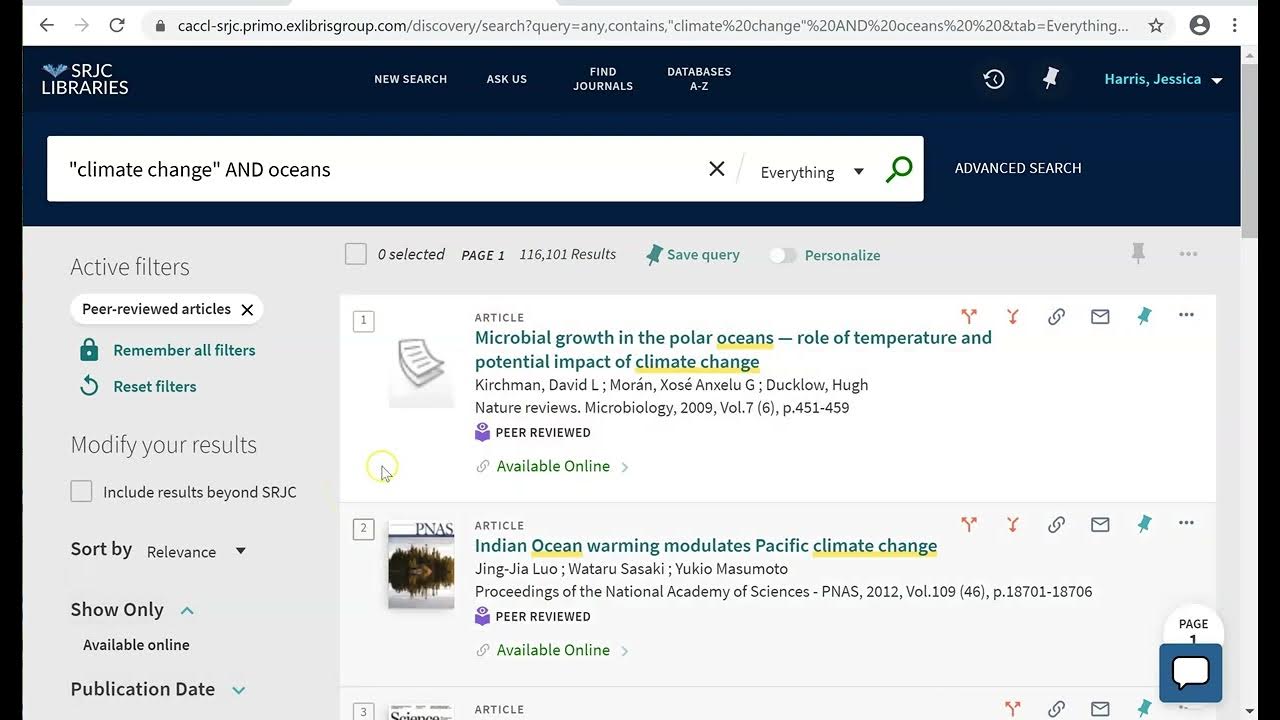
- 📚 Example: Searching for "academic writing" AND university AND "first year" narrows results to just over 4,000.
- 🗂️ Keep a record of useful references you find during your search.
- 💡 Note new search words or phrases that could refine future searches.
- 🔄 By recording references and search terms, you can conduct a more systematic and effective search on Library Search.
- 📌 Exploring related terms, such as 'tutor feedback', can help expand or adjust your search strategy.
Q & A
What is the main challenge when using Library Search?
-The main challenge is being overwhelmed by the sheer number of results, especially when searching for academic writing, which can yield millions of results.
How can you reduce the number of results in Library Search?
-By typing more words into the search bar, you will get fewer results. Library Search will only return results that include every word typed.
What does the search query 'academic writing university' return in Library Search?
-This search will return results that include all three words—'academic', 'writing', and 'university'—but not necessarily in a specific order.
How do you search for a well-known phrase in Library Search?
-To search for a specific phrase, put it in double quotation marks. For example, searching for 'academic writing' will return results where these two words appear together as a phrase.
What happens when you add more words or phrases to your search query?
-Adding more words or phrases refines your search and results in fewer, more relevant results. For example, searching for 'academic writing' and 'university' with 'first year' will return more focused results.
How can you further reduce the number of results in your search?
-You can reduce the number of results by adding more specific words or phrases to the search. For example, adding 'first year' to the previous search query can narrow the results down to fewer than 4,000.
Why is it important to record useful references and search terms?
-Recording useful references and new search terms allows you to refine and adapt your search more effectively. This ensures that you are conducting a more systematic and targeted search.
How can recording new search terms improve your research?
-By recording new search terms, you can continuously refine your search strategy. For instance, if you find the term 'tutor feedback' relevant, you can add it to future searches to explore this topic further.
What is the benefit of using a systematic approach to searching in Library Search?
-A systematic approach ensures that you conduct more efficient and focused searches, which leads to finding more relevant resources while avoiding unnecessary results.
What should you do if you find new search words or phrases while exploring resources?
-You should record any new search words or phrases that seem relevant to your research. This allows you to refine your searches and find more specific resources in future searches.
Outlines

هذا القسم متوفر فقط للمشتركين. يرجى الترقية للوصول إلى هذه الميزة.
قم بالترقية الآنMindmap

هذا القسم متوفر فقط للمشتركين. يرجى الترقية للوصول إلى هذه الميزة.
قم بالترقية الآنKeywords

هذا القسم متوفر فقط للمشتركين. يرجى الترقية للوصول إلى هذه الميزة.
قم بالترقية الآنHighlights

هذا القسم متوفر فقط للمشتركين. يرجى الترقية للوصول إلى هذه الميزة.
قم بالترقية الآنTranscripts

هذا القسم متوفر فقط للمشتركين. يرجى الترقية للوصول إلى هذه الميزة.
قم بالترقية الآن
5.0 / 5 (0 votes)

